Pick Your Agent, Then Your Model: OpenCode on Private Inference

Muse quickly reached millions of users within weeks of its launch. Meta's huge user base certainly helps. But another reason, and arguably the more interesting one, is the experience: a cute design, a simple interface, and an agent that makes getting things done feel easy.
The model behind it is not the leader. On GDPval-AA, Artificial Analysis's test of performance on real-world work tasks, Muse Spark 1.3 scores 1681, 185 points behind the top model.
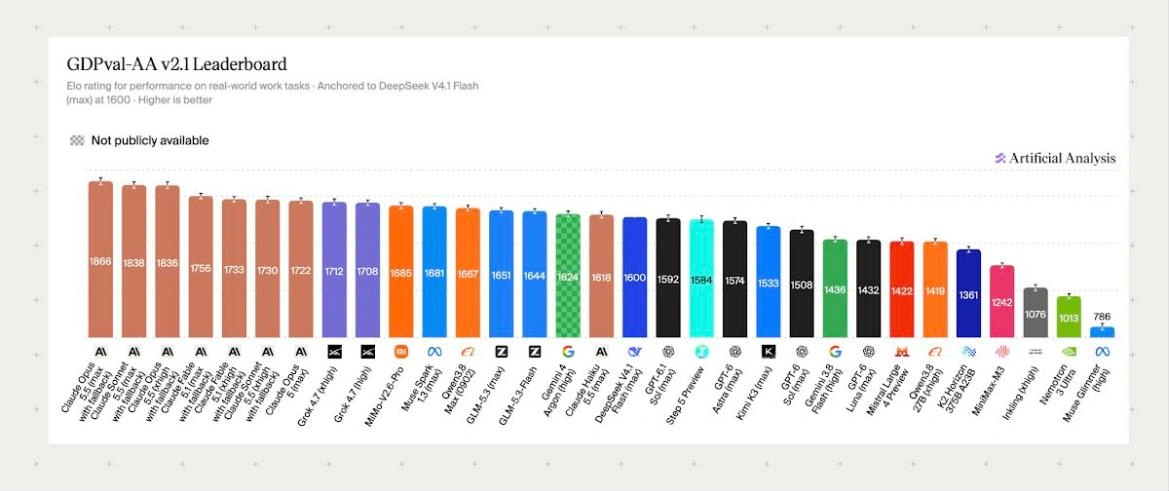
GDPval-AA v2.1 Elo, real-world work tasks. Source: Artificial Analysis, 9 October 2026.
People use Muse for the experience. You notice the difference when an agent remembers context, finds the right tool, and follows a task through to completion.
As more models become capable options for everyday work, there's more room to choose the setup that fits you: the agent experience, the model, the cost, and how your data is handled.
Muse's growth has also raised questions about privacy. TIME reported that it maintains hourly-updated profiles of users and the people they mention, including people who never signed up. Since memory is part of what makes an agent useful, it also raises two questions: where that memory lives, and who can access it. Both matter when choosing your setup.
Pick your agent and pick your model
An open-source agent gives you another option: choose the agent experience you like, then connect the model that works best for you. You don't have to take both as a package.
That model could be open or closed. You might want a fast, inexpensive model for routine work and a more capable one for harder tasks. Open models hold up on the same leaderboard. GLM 5.3 Flash scores 1644, 37 points behind Muse Spark 1.3. It runs in our TEE from $0.15 per million input tokens. An agent that supports different providers lets you experiment without rebuilding your workflow every time.
And that's where you can control who owns the data and who has control over it. If open models can handle most of your everyday work, you no longer have to send that work to a closed provider. Instead, you can run them inside a Trusted Execution Environment (TEE), hardware that keeps your data isolated with an attestation you can verify yourself.
Run OpenCode with NEAR AI models
OpenCode is a good place to start. It's an open-source coding agent that works with any provider, so you can connect NEAR AI models and switch between them without changing your workflow.
For private inference, pick a model labeled "Private TEE" or "Private 3P TEE" in the NEAR AI model catalog. OpenCode's picker does not show those labels, so check the catalog first. OpenCode syncs a session to its servers only if you run /share.
Here's how to get started:
- Get your API key. Create an account in the NEAR AI Cloud dashboard and generate a key.
- Connect OpenCode. With OpenCode installed, run /connect, choose NEAR AI Cloud, and paste your key.
- Choose a model and start building. Run /models, select a model, and give it a task from your project.
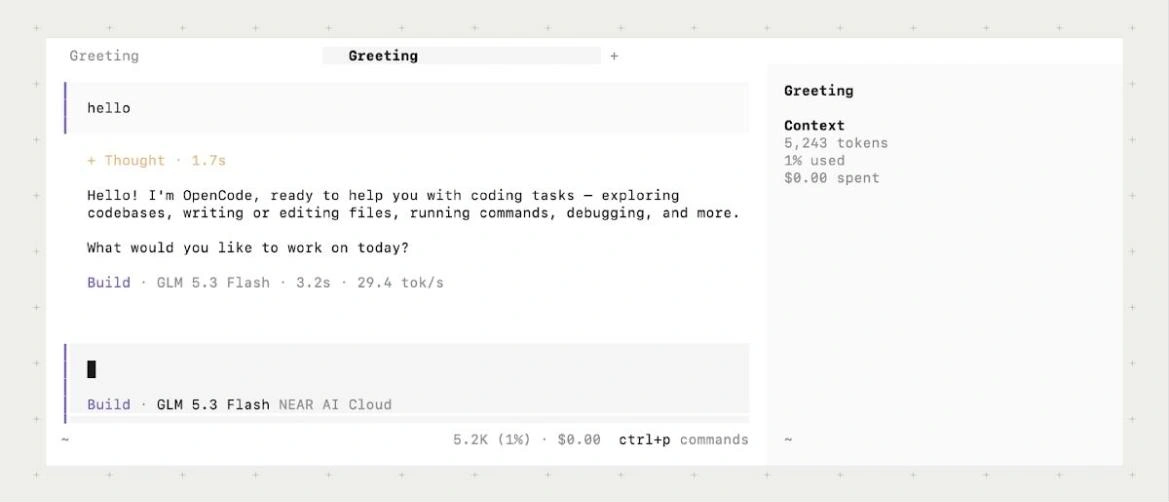
Then try another model. Compare the result, the speed, and how much guidance each one needs.
The OpenCode setup guide covers the full walkthrough, including models that are not in the picker yet. More harnesses and apps are in our integration guides.
Frequently asked questions
Can I switch models in OpenCode without changing my setup?
Yes. OpenCode works with any provider. Connect NEAR AI Cloud once, then switch models with /models while the rest of your OpenCode workflow stays the same.
Which NEAR AI models keep my code private in OpenCode?
Models labeled "Private TEE" run inside NEAR AI's hardware-isolated, attested environment. Models labeled "Private 3P TEE" run in an attested third-party enclave. Check the label in the NEAR AI model catalog before you pick one.
Are closed models private on NEAR AI Cloud?
Closed models run through Incognito. NEAR AI's TEE router hides your account, and the model runs at the provider.
Does private inference on NEAR AI Cloud cost more?
No. Open models in sealed hardware start from $0.15 per million input tokens, and NEAR AI-hosted TEE models carry no privacy premium.
Can I use a NEAR AI model that isn't in the OpenCode picker?
Yes. The NEAR AI OpenCode setup guide shows how to add any NEAR AI Cloud model to OpenCode by hand.