Assume We're Lying: How to Verify Private Inference

In September 2026, OpenAI announced that a fleet of its AI agents solved the Navier-Stokes equations. Hours before the announcement, NYU mathematician Tristan Buckmaster said the proof followed a path suspiciously close to work he and his collaborator had been developing for years, largely assembled inside OpenAI's Codex. Buckmaster said he did not know what the model had done, did not know whether their data had been used, and was not accusing anyone of anything. OpenAI denied accessing or using the unpublished work but acknowledged that it could not rule out that the researchers' own product usage had shaped its model's training.
Read that again! The mathematician can't tell whether his work was used, the company says it wasn't, and in the same breath says it can't be certain. Both statements may be completely honest, and the verdict depends on who you'd rather believe.
Fortunately, it does not have to work this way. If you send a model something you can't afford to lose, you shouldn't have to take a company's word for what happened next. You should be able to check what ran, what it saw, and what it kept.
That's why we at NEAR AI built Private Inference with Attestation. "Assume we're lying" is an invitation to check. This post covers how NEAR AI Cloud handles your data, and how you can verify every claim in it yourself.
How Private Inference works
You don't need to assume NEAR AI is trustworthy. Hardware-enforced isolation protects your data, and you can independently verify those protections through cryptographic evidence.
TEE-hosted models on NEAR AI Cloud run inside Intel TDX confidential virtual machines, using NVIDIA H200 GPUs in confidential-computing mode.
A confidential VM encrypts its private memory and protects it from access by the host operating system, the hypervisor, and the people who run the datacenter. The CPU enforces that boundary in hardware.
But how do you know your request reaches that protected environment? Verification starts with an attestation report: hardware-signed evidence of the platform and its measured software, including the boot image and software manifest. You request fresh evidence using your own nonce, a random challenge that prevents an old report from being replayed. You check the hardware evidence against Intel and NVIDIA's verification infrastructure and the software measurements against the code you expect.
That evidence is the starting point for following your prompt through the system. The rest of this post explains what you can verify at each stage:
- What ran. The hardware, code, and model that processed your request.
- What saw your prompt. The components that accessed it along the way.
- What remained. The data retained after the response.
The Life of a Prompt
Suppose you send a confidential document to a TEE-hosted model and ask for a summary. We'll follow that request through three questions.
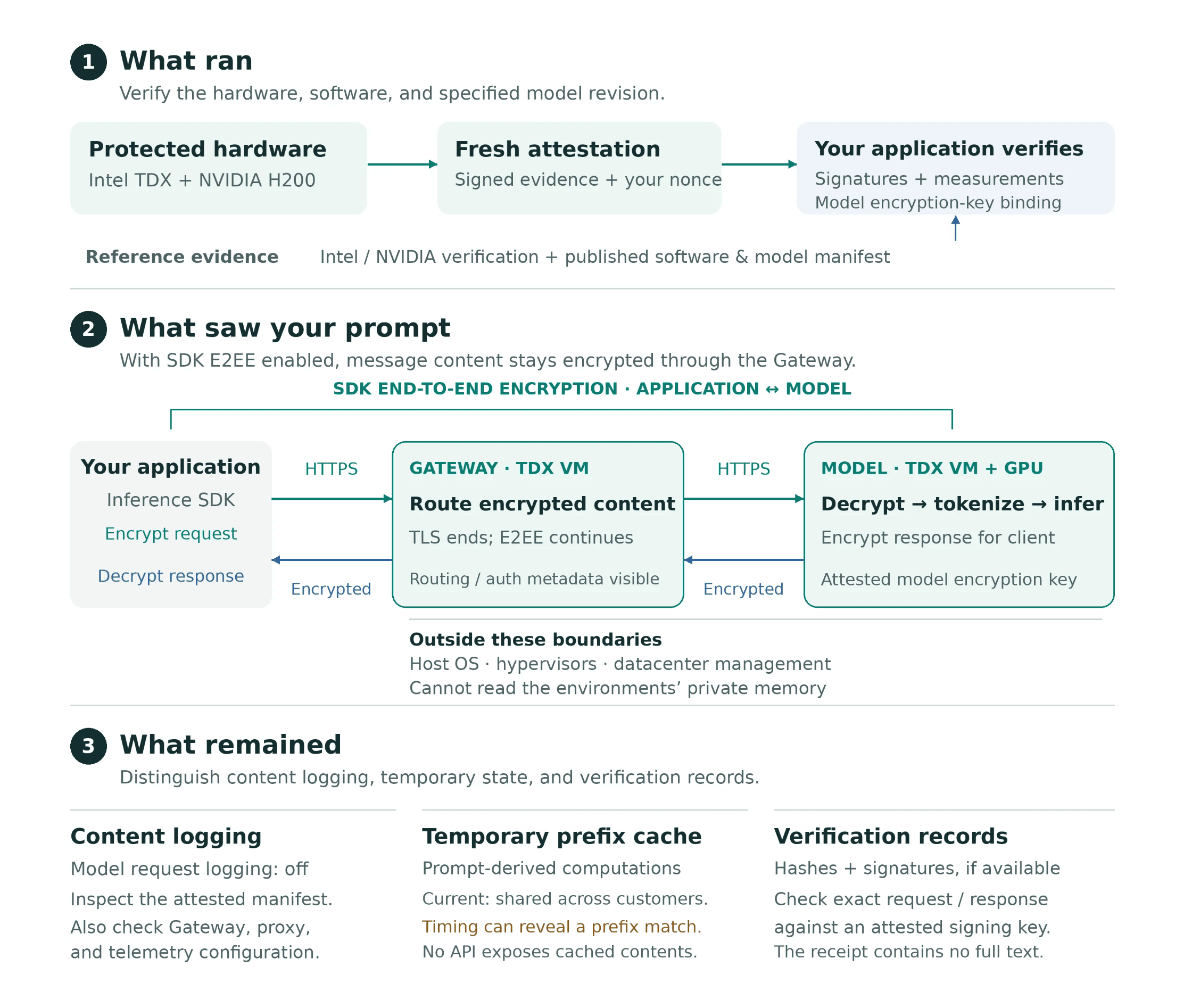
What ran
Before sending the document, your application can request fresh attestation evidence for the NEAR AI Cloud Gateway and the model environments that may serve the request.
Verification starts with the hardware that ensures evidence comes from genuine Intel and NVIDIA hardware operating with the required protections. Next come software measurements, which are compared with the expected deployment configuration to identify the software images and model revision.
The deployment manifests are public at github.com/nearai/cvm-compose-files, and they let you inspect the configuration and connect the attested measurements to a specific deployment. Checking the hardware signature establishes where the evidence came from, and the software establishes whether you accept that environment.
What saw your prompt
Your document travels over an encrypted HTTPS connection to the Gateway, which runs inside its own confidential VM. Connection verification binds the live TLS connection to the attested environment, establishing where the encryption ends.
Inside that protected environment, the Gateway routes the request to the model's confidential environment. There, the serving software tokenizes the input, the GPU performs inference, and the response streams back through the Gateway.
The Gateway and model-serving software process your content, and the surrounding infrastructure (the host operating systems, hypervisors, and datacenter management systems) sits outside the protected boundary. This is why verifying the software inside that boundary matters as much as verifying the hardware around it.
When a response signature is available, you can also verify a cryptographic receipt binding the exact request and response bytes to an attested signing key. That receipt lets you check the exchange afterward.
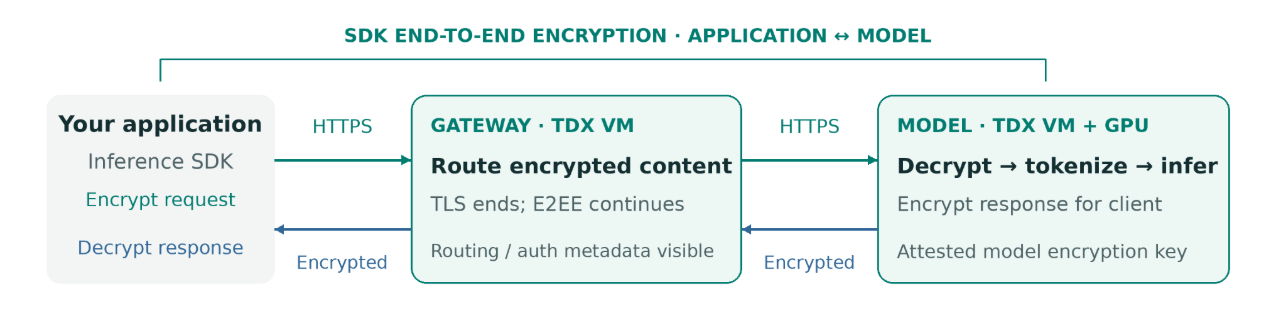
The Inference SDK adds optional end-to-end encryption (E2EE) on top of HTTPS. It encrypts message content in your application using a key bound to the model environment's attestation. The content stays encrypted as it passes through the Gateway and is decrypted only inside the model's confidential environment. The response is encrypted back to your application, where the SDK decrypts it automatically. The Gateway can still see routing and authentication metadata, but it cannot read the encrypted message content.
What remained
Receiving a response does not mean every trace of the computation immediately disappears. Distinguish three things: usage logging, temporary inference caches, and verification records.
- Usage logs. NEAR AI retains usage logs from the Gateway. The model server starts with request logging disabled. You can inspect that setting in the published deployment manifest and check that it matches the attested deployment. This covers the model server; to check the full request path, also review the Gateway, proxies, and telemetry configuration.
- Cache. The model server temporarily keeps computations derived from the beginnings of prompts, called prefixes. Reusing them makes repeated requests faster. These caches are still derived from your content. In the current configuration, reuse depends on matching tokens rather than customer identity, so identical prefixes can share cached computations across customers. There is no API to read another customer's cache, but response timing can reveal whether a guessed prefix was previously processed.
- Verification records. Hashes and signatures may remain after the request so you can verify the exchange. Keeping these records is different from keeping your document or the generated summary.
Verify it
You can check the evidence yourself by calling the APIs directly, or use our SDK to bring verification into your application.
Call the APIs yourself. Start by requesting an attestation report from https://cloud-api.near.ai:
GET /v1/attestation/report
Include a fresh nonce, a random value you generate, to check that the report was created for your request. Then validate the Gateway and model evidence, and check that the response signature matches the verified signing identity. The verification guide walks you through each step, including checking the connection and the software being run.
Use our SDK. To get started, install the TypeScript package:
npm install @nearai/inference-sdk
The SDK checks Gateway and model attestations, encrypts supported request fields, and decrypts responses for your application. You can also call verifyResponse(id) to check a response's signature. It works with the OpenAI SDK, so you can keep the interface you already use. Follow the SDK guide for setup and examples.
What this doesn't prove
Attestation helps you check which hardware and software you're trusting. It does not prove that the code has no bugs. These protections also depend on Intel's and NVIDIA's hardware and attestation systems; a compromise there could weaken the guarantees.
Summary
"Assume we're lying" is an invitation to check. Inspect the software, verify the environment, and understand what remains after your request. Assumptions and limits remain; we've made them explicit so you can decide whether they meet your needs. Your data deserves that scrutiny. So do NEAR AI's claims.